Blog
August 21, 2026
·9 min readWebAR vs App-Based AR for Ecommerce: A Decision Guide

Otuokon Nsikak
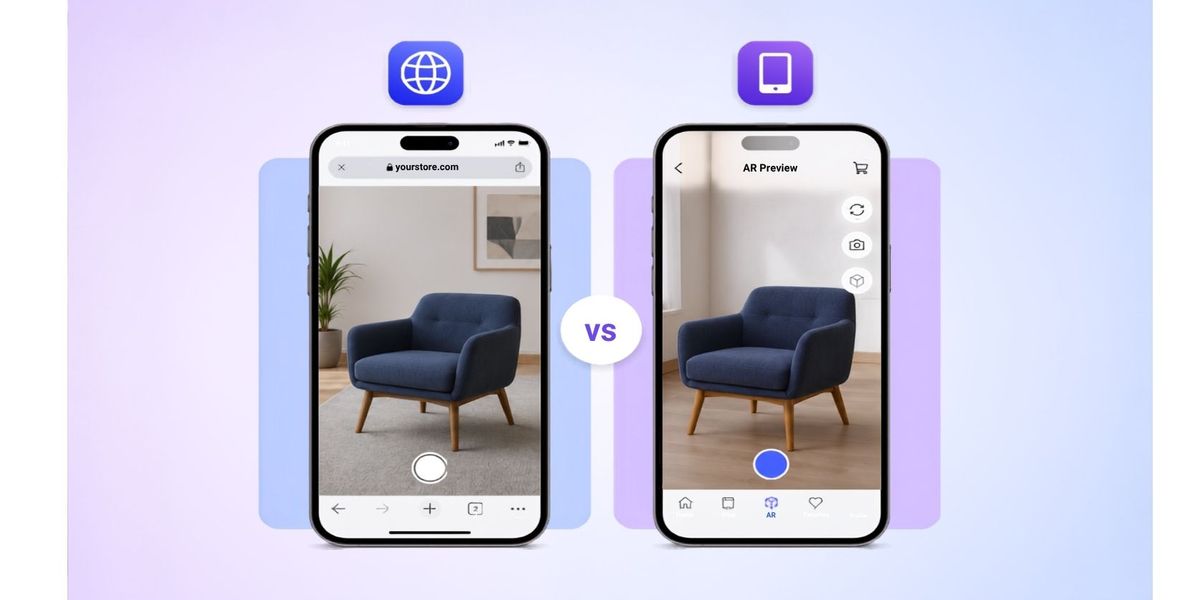
Choose WebAR when a buyer should launch augmented reality from a product page, campaign link, or QR code without first installing a dedicated app. Choose app-based AR when the experience belongs inside an existing mobile product or needs a level of native control, repeat use, account context, or device integration that the web route cannot meet.
The decision is not a contest between a simple option and an advanced option. It is a delivery decision. Ecommerce, digital product, mobile, and 3D teams should define the buyer journey, required interaction, device coverage, asset pipeline, fallback, measurement, and maintenance owner before selecting either route.
This guide gives those teams a practical way to make and test that decision.
What is the difference between WebAR and app-based AR?
WebAR starts from a web entry point. A buyer follows a link or taps a product-page control, and the implementation opens an AR-capable route supported by the device. On Android, a website can launch Google Scene Viewer for a compatible 3D model. On Apple devices, websites can link supported USDZ content into AR Quick Look. WebXR is another web standard used for immersive applications where the browser and device support the required session.
App-based AR is delivered inside a native mobile application. The team owns an iOS application, an Android application, or both, and integrates the required AR framework, interface, account state, content delivery, and release process into that product.
The visible buyer task may look similar in both cases, but the commercial and operational model is different.
Start with the buyer journey
Write down the exact moment when AR should help.
For a product page, the buyer may want to:
- place a piece of furniture in a room;
- inspect the scale of equipment in a workspace;
- compare an approved product variant in context;
- open a campaign experience from packaging or a QR code; or
- continue from AR to a product, enquiry, or purchase route.
Then record what happens immediately before and after that moment. If the buyer arrives from search, a shared link, paid media, or a product page, asking for an app installation may interrupt a short evaluation task. A web route is often the more direct pilot for that journey.
An app route becomes more defensible when the buyer or employee already uses the application and AR is one part of a recurring workflow. Examples include an authenticated field-sales tool, a service application with saved equipment records, or a product application whose users return regularly.
Do not assume either route will work because the idea sounds plausible. Test the full journey with representative users and devices.
Define the capability boundary before choosing the channel
Create a requirements list before discussing platforms. Separate essential capability from optional polish.
Record whether the experience needs:
- simple product placement or a more controlled spatial workflow;
- one product or a catalogue search and selection flow;
- approved colours, materials, or component states;
- account login, saved projects, or persistent preferences;
- camera, location, motion, or other device access;
- offline operation;
- custom rendering or interaction behaviour;
- links back to product, quote, or purchase steps;
- analytics and consent handling; and
- an accessible non-AR route.
Apple describes RealityKit as offering more control over rendering and customisation for native experiences. Google provides ARCore tools for native Android development, while Scene Viewer can be launched from a website or Android app. Those choices show why the team should validate requirements against the actual delivery path rather than treating WebAR as one uniform capability.
If a requirement is essential, document how it will be implemented and tested. If it is only desirable, do not let it force a larger application project before the basic buyer task has been proven.
Compare distribution and entry friction
WebAR is usually easier to distribute because the entry point can be a normal HTTPS link. The same link can appear on a product page, in a message, in a campaign, or behind a QR code. The team can update the linked page or model without asking the buyer to install a new application version.
That does not mean every visitor will receive the same AR result. Device support, operating system, browser, model format, permissions, and installed services can change the route. Google documents a fallback URL for Scene Viewer when the required application path is unavailable. A dependable web implementation therefore needs a useful 3D or image fallback and clear launch language.
An app adds installation and release steps, but those steps may be acceptable when the organisation already has a relevant installed audience. Use real product data to estimate the reachable audience. Do not justify a new app by assuming customers will install it for a single product view.
Plan the asset pipeline for each destination
The delivery channel does not remove the need for controlled 3D assets.
For each product, keep:
- an approved source model;
- real-world scale and orientation;
- named materials and variants;
- usage rights and product ownership;
- a versioned delivery asset for each destination;
- validation evidence; and
- a record of every page or application using that revision.
Google Scene Viewer accepts web-hosted glTF or GLB input and publishes validation guidance for its supported route. Apple AR Quick Look uses USDZ or Reality content. A team that needs both Apple and Android coverage should plan the export, validation, and revision process for both destinations instead of assuming one successful file proves the other.
The GLB versus glTF asset handoff guide explains how to control the web delivery package. The same governance principle applies here: validate the exact file that reaches the buyer.
Design a fallback that still completes the buyer task
AR should add context, not hold essential product information hostage.
If AR cannot launch, the page should still provide:
- accurate product images or an interactive 3D view;
- dimensions and units;
- approved options and specifications;
- compatibility, installation, or safety information where relevant;
- a clear product, enquiry, or purchase route; and
- a useful explanation when the device is unsupported.
Test the fallback from the same links and devices used for the main AR route. A fallback that exists in a requirements document but is hidden, broken, or disconnected from the buyer task is not an acceptable result.
Define data, privacy, and analytics ownership
AR can involve camera access, device capability checks, interaction events, product selections, and links into a commercial journey. The implementation team should define what data is collected, why it is needed, where consent applies, how long it is retained, and which team owns the measurement plan.
Use analytics as diagnostic evidence. Track whether the launch control was visible, whether the route opened, whether a fallback was used, and whether the buyer reached the intended next step. Do not label an AR project successful because it generated interactions without connecting those events to a defined business task.
For an app, include the AR events in the existing mobile privacy and release process. For WebAR, include the viewer, linked services, consent tools, and destination page in the web review. Legal and privacy teams should approve the actual implementation, not a generic description of AR.
Compare maintenance and release ownership
Web delivery can shorten the route for content updates, but it still needs owners for models, pages, browser testing, analytics, and incident response. Native delivery adds application builds, store releases, operating-system testing, and version support.
Before approval, name the owner for:
- source and delivery assets;
- product and variant accuracy;
- the web page or mobile application;
- Apple and Android testing;
- fallback content;
- privacy and analytics;
- release approval; and
- corrections after launch.
Record how a product change reaches every live AR destination. If the source product changes, create a new controlled revision, repeat the validation, and retire or update outdated delivery assets through the approved release process.
Run a representative pilot
Choose one product whose scale, materials, or options make AR useful. Avoid the easiest model if it does not expose the real delivery risks.
Test the WebAR route on:
- the live product-page template;
- supported Apple and Android devices;
- representative browsers and connection conditions;
- the intended link and QR-code entry points;
- accepted and denied camera-permission states;
- unsupported-device and missing-service fallbacks;
- the accurate product scale and orientation; and
- the next product, enquiry, or purchase step.
Test an app-based route against the same buyer task, plus installation, authentication, saved state, application updates, operating-system versions, and recovery after interruptions where those behaviours are in scope.
Capture the asset revision, device, operating system, browser or app version, entry point, result, and approver. The pilot should produce evidence that the selected route can be operated and maintained, not only a polished demonstration.
A WebAR versus app-based AR decision checklist
Choose a WebAR pilot when:
- the experience starts from a website, campaign, message, or QR code;
- the buyer task is short and does not justify installing an app;
- the required interaction is supported by the target device routes;
- a useful 3D or image fallback can complete the task; and
- the web team can own testing, measurement, and updates.
Choose an app-based pilot when:
- AR belongs inside an existing mobile product or recurring workflow;
- account context, persistent state, offline use, or native control is essential;
- the organisation can support iOS and Android release work where required;
- the installed or expected audience justifies the distribution model; and
- the mobile product team owns ongoing testing and maintenance.
Hold the project when the buyer task, device coverage, asset rights, fallback, privacy basis, or release owner is unresolved.
Where SwiftXR fits
SwiftXR currently positions its 3D, AR, and VR experiences as browser-delivered experiences that can be shared or embedded without requiring a dedicated app download. That makes it a relevant route for teams testing product-page, campaign, or QR-code entry into interactive product content.
The platform does not remove the need for approved source assets, destination testing, accurate product information, fallbacks, privacy review, or release ownership. Use the SwiftXR platform overview and 3D model viewer to define a representative browser-based pilot, then test the exact buyer journey before wider catalogue rollout.
Book a SwiftXR demo to scope the product, delivery route, fallback, and acceptance evidence for that pilot.