Blog
November 5, 2026
·9 min readQR Code Packaging: What Should Customers See After They Scan?

Otuokon Nsikak
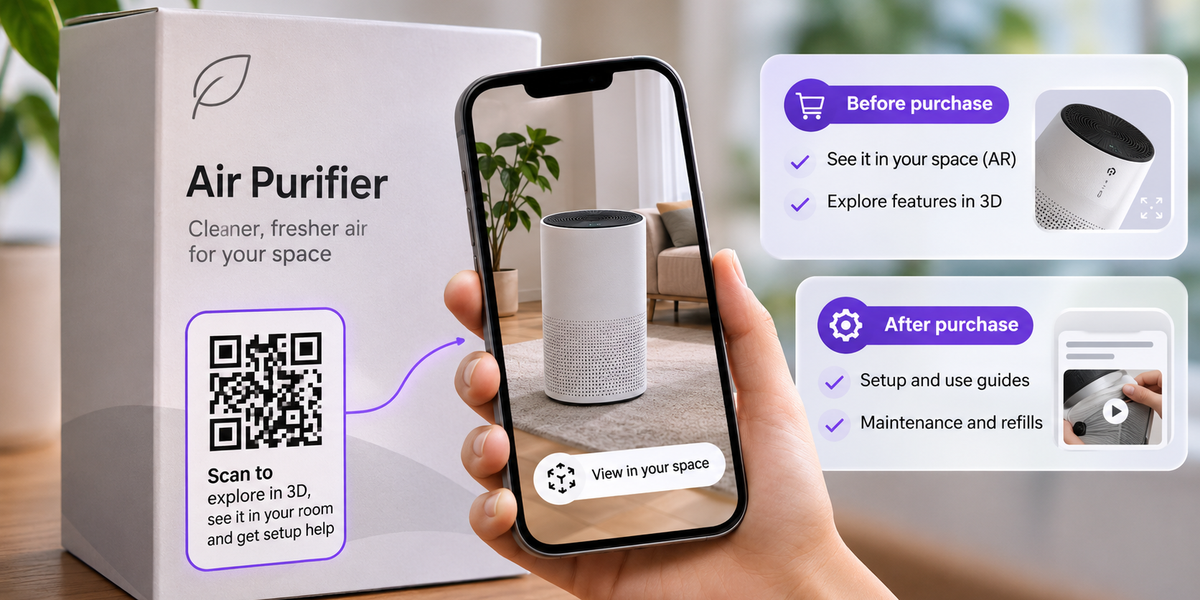
Someone picks up your product, notices a QR code on the packaging, and scans it.
What should they see?
A product animation might grab their attention, but it won't necessarily help them make a decision, use the product, or find what they need.
For brands investing in QR code packaging, that's the question worth answering before anything goes to print.
A packaging QR code should lead to an experience that matches the customer's situation. Before purchase, it should help them decide whether the product is right for them. After purchase, it should help them use, maintain, refill, or reorder it.
Get those two moments right, and your QR code has a job beyond looking innovative.
What's in this guide
- What DUUX's interactive packaging gets right
- What customers need before and after purchase
- Choosing between AR, 3D, video, and ordinary webpages
- Printing, updating, and managing QR codes across markets
- Making the experience useful when AR isn't supported
A real example: How DUUX uses QR codes on packaging
DUUX, an air-treatment brand featured by SwiftXR, offers a useful example.
According to its testimonial on SwiftXR's website, DUUX uses QR codes on eco-friendly, minimal-print packaging to give customers access to interactive product experiences.
After scanning, customers can virtually place a product in their surroundings to assess how it fits their space and décor before purchasing.
This solves a specific problem. A packaging box can show dimensions and photographs, but it cannot easily demonstrate how an appliance might look in someone's living room.
AR gives the customer additional context.
The minimal-print approach is interesting for packaging teams, too. Digital content can supplement information that would otherwise require more printed material, although that doesn't automatically mean less packaging waste.
SwiftXR hasn't published verified conversion figures or environmental savings for this implementation, so those outcomes shouldn't be assumed.
The lesson is more useful than a percentage anyway: DUUX connects the QR code to a question its customers genuinely have.
For brands considering something similar, that is a sensible place to begin.
Before purchase vs after purchase: What should the QR code show?
A customer scanning in a shop and someone scanning at home may be looking at exactly the same packaging.
But they probably want different things.
The first person is evaluating the product. The second may already own it and need help.
That distinction should shape your interactive packaging strategy.
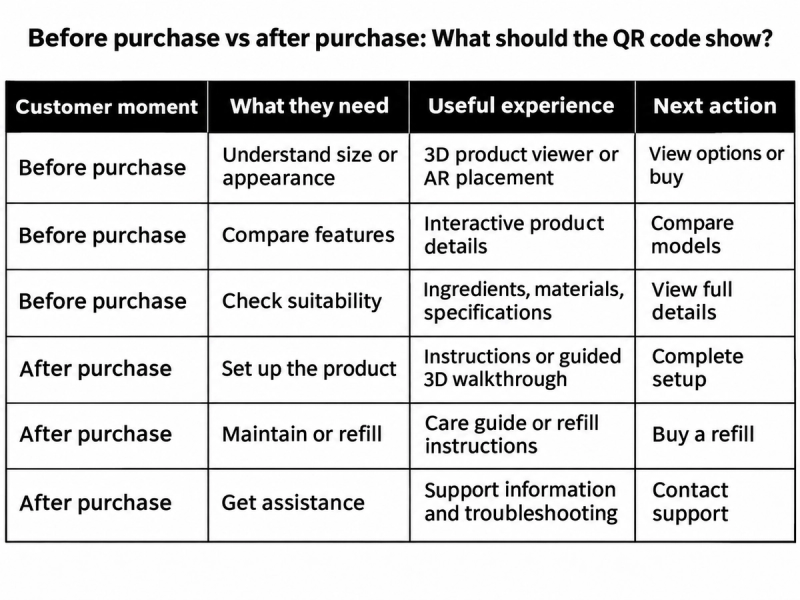
Before purchase: Help customers make a decision
Imagine someone comparing two air purifiers in a store.
They can already see the packaging, pricing, and basic specifications. What they may not know is how the product looks in a room or whether its proportions suit their space.
An AR preview could help answer that question.
For electronics, an interactive 3D model with hotspots might help customers understand connections or features.
For skincare, a clear ingredient and usage page may be more helpful than AR.
Choose the experience based on what the customer still needs to know.
After purchase: Help customers get more value
Now imagine that someone bought the air purifier and scans the same box a week later.
They probably aren't wondering how it would look in their room anymore.
They may need setup instructions, filter replacement guidance, or a way to buy accessories.
A useful post-purchase destination could provide those resources without making customers search through the brand's website.
For some products, the same landing page can serve both moments through clearly labelled options such as Explore Product and Setup & Support.
For others, separate packaging codes may make sense.
Decide which approach fits the product's lifecycle before finalising the packaging design.
Four experiences worth considering for interactive packaging
The technology should follow the customer's need, not the other way around.
1. Interactive 3D product exploration
This works when customers benefit from inspecting the product from multiple angles.
A premium appliance brand could let shoppers rotate a product, zoom into important details, and explore available finishes.
2. Augmented reality product placement
AR is useful when real-world context matters.
Furniture, home appliances, and decorative products are natural candidates because customers often need to judge size, appearance, and placement.
3. Interactive product information
Hotspots can help explain features without overwhelming the experience with text.
For example, a coffee machine manufacturer could label the water tank, control panel, and removable parts.
4. Product instructions and support
For customers who already own the product, straightforward setup information may be the best destination.
A short video, illustrated guide, or well-organised support page can be more valuable than an elaborate animation.
The next action matters in every case. After exploring, the visitor should have a clear route to buy, learn more, request support, or find a refill.
What packaging teams should decide before printing
This is where a promising QR-code idea becomes a real production decision.
A brand manager may approve the experience, but packaging, print, legal, and regional marketing teams still need to know how it will work once thousands of units are in circulation.
Will the link still work next year?
A static QR code contains a fixed destination. A dynamic QR code uses a redirect that can be changed later.
SwiftXR allows teams to update published projects during an active subscription. Its documentation also describes updating an existing project through the editor.
However, brands should verify that their specific published URL remains unchanged after updates.
For packaging expected to remain in circulation, consider a stable branded URL or managed redirect. This gives your team more control over the destination, provided the redirect service is maintained.
Test that process before approving the print run.
Will customers be able to scan the printed code?
Use strong contrast and leave a clear quiet zone around the QR code.
Avoid placing it across folds, seams, or heavily curved surfaces. Glossy finishes can also create reflections that interfere with scanning.
A code on a small product box needs different sizing from one on a large display carton.
Print a physical proof and test it under realistic conditions, using more than one phone.
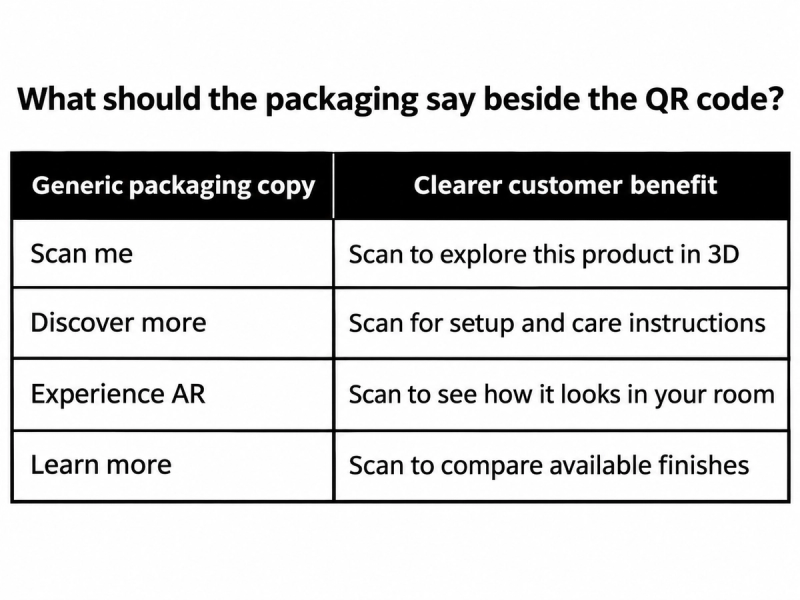
A short, specific promise is easier to understand than a generic invitation.
Whatever you print should accurately describe the destination.
What happens across different markets?
If your products ship internationally, the experience may need different languages, support information, product specifications, or purchasing destinations.
One centrally managed QR-code destination could direct users to localised content, but that requires a deliberate website or routing setup.
SwiftXR's public materials do not establish automatic language detection or market-based QR routing as built-in capabilities. Treat localisation as an implementation requirement to verify, not a feature to assume.
Before sign-off, have the relevant brand, packaging, technical, and regional teams review the destination, printed instruction, supported devices, and update process.
What if customers cannot open the experience?
Not every phone supports every AR feature.
Some customers may deny camera permission, encounter a slow connection, or open the destination inside an app with limited browser functionality.
Plan for that before launch.
A customer who can't access AR should still be able to view the product in 3D, see ordinary photographs, or read the information they came for.
If the experience requires the camera, explain why permission is needed. If the visitor declines, provide an alternative.
Where an in-app browser prevents AR from launching, offer a clear way to continue in the phone's main browser.
The packaging experience should remain useful even when its most advanced feature isn't available.
For the technical setup, see our companion guide: How to Create a QR Code That Opens an AR Experience Without an App. [Internal link to be added after publication.]
How SwiftXR fits into an interactive packaging campaign
SwiftXR provides tools for creating browser-accessible 3D and AR experiences, including product viewers, hotspots, and QR-code publishing.
A packaging team could use it to build an experience that helps customers inspect a product, understand its features, or view it in their surroundings.
Teams can also update published projects while their subscription is active, subject to confirming the destination-link behaviour for their campaign.
For measurement, SwiftXR's Starter plan provides basic customer-view analytics, while Pro and Business include full analytics dashboards. Tracking downstream actions such as purchases, refill orders, or support requests may require additional configuration.
If you're planning an interactive packaging campaign, explore SwiftXR's capabilities and assess which experience fits your product and customer journey.
Is interactive QR code packaging worth the investment?
Sometimes a simple product webpage is the right answer.
If customers only need an ingredient list or a support phone number, creating a 3D model may add cost without solving a meaningful problem.
Interactive 3D and AR become more compelling when customers need to explore features, compare options, or understand a product in context.
Packaging teams also need to account for asset creation, mobile performance, print production, ongoing maintenance, and internal approvals.
Start with one product and a specific use case. Measure whether visitors engage with the information and complete the intended next action before expanding across a larger range.
Frequently asked questions
What should a packaging QR code link to?
It should open information or an experience that matches the customer's needs, such as product exploration, instructions, specifications, support, or a relevant purchasing page.
Should the same QR code serve customers before and after purchase?
It can. A landing page with clearly separated product exploration and support options may work well. For more complex products, separate destinations might provide a clearer experience.
Can brands update interactive packaging content after printing?
Yes, if the QR code points to a destination that remains stable or can be redirected. SwiftXR supports updates to published projects, but confirm URL persistence for your specific implementation.
Can QR code packaging support different languages?
Yes, through an appropriately configured localised website or routing system. Automatic localisation within SwiftXR should be verified before making it part of a campaign commitment.
Does interactive packaging increase sales?
It may help customers understand products and make better-informed decisions, but higher sales are not guaranteed. Results depend on the product, the experience, and what visitors do afterwards.
Give every scan a purpose
The most useful packaging QR codes solve a problem at the moment someone scans.
Before purchase, that might mean helping a shopper understand what they're buying. After purchase, it might mean making the product easier to set up, maintain, or reorder.
Choose the experience that serves that need, make the next action obvious, and ensure the destination can be maintained for as long as the packaging remains in circulation.
With SwiftXR, brands can create interactive 3D and AR product experiences that give packaging a more useful role in the customer journey.