Blog
September 8, 2026
·5 min readHow to Create and Configure a 3D Product With AI

Otuokon Nsikak
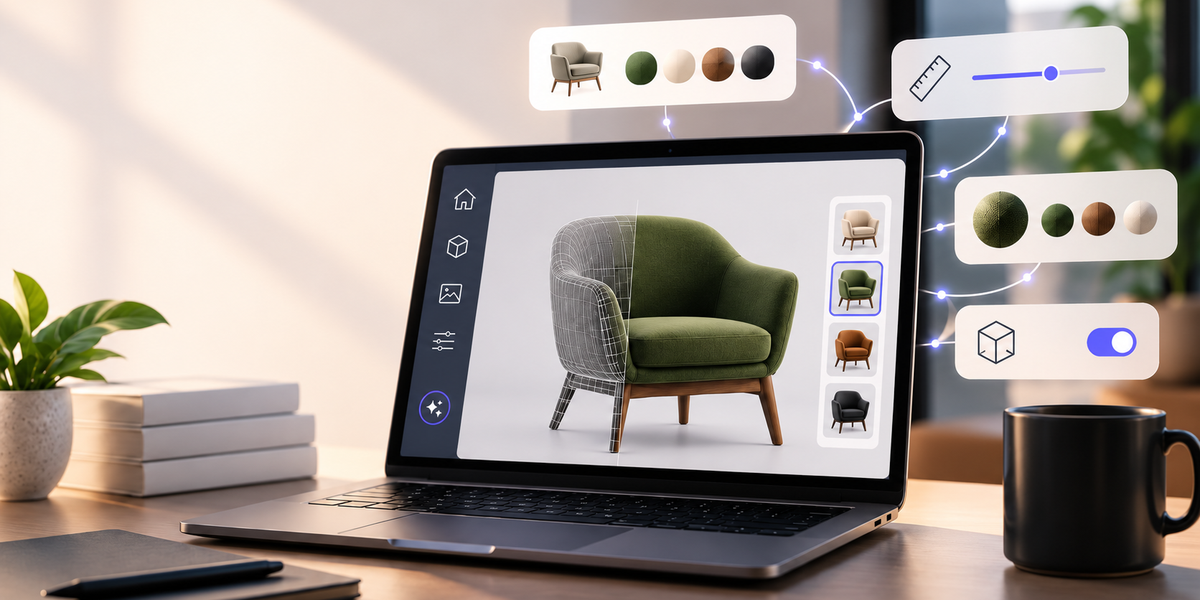
Creating a 3D product experience has traditionally meant moving through multiple panels, settings, and configuration steps, one for the material, another for the color, another for scale, another for the camera. Each step assumes you already know where to look.
That workflow is starting to change.
With SwiftXR Assistant, you can create and configure a 3D product experience by describing what you want, in plain language, from the moment your model is live to the moment it's ready to publish.
Start With the Product You want to create
The process begins the same way an idea does: with a description, not a blank set of tools.
Open the SwiftXR AI Assistant and describe the product you want, "a lounge chair," "a ceramic vase," "a pair of wireless earbuds", and it generates a starting 3D model directly in the editor. From there, describe any changes you want to make, and watch the model update as you go.
You're not hunting for the right panel before you've made a single decision. You're starting from the thing you actually have in mind, and letting the description carry you into the workspace instead of the other way around.
This is a small shift, but it changes where the effort goes. Instead of spending the first few minutes of a session finding your way around the editor, you spend it clarifying what you're actually trying to build.
Configure the Product in Plain Language
Once your model is in the editor, configuration works the same way: you describe the change, and the model updates.
- "Change the color."
- "Change the material."
- "Resize the base."
- "Change only the handle, leave the rest as it is."
- "Create a variant in navy and one in cream."
Each of these is a decision a merchandiser, founder, or product marketer has already made in their head. The Assistant's job is to close the distance between that decision and its execution, not to make the decision for you.
Specific requests work best. "Change only the tabletop to white marble and leave the base unchanged" gives the Assistant a clear component, a clear outcome, and a clear boundary. Vaguer prompts, "make it look better", leave too much open to interpretation to produce a reliable result.
The prompt does the searching. You still do the deciding.
Here's a replacement that stays sales-forward without repeating ground already covered:
Turn the Model Into a Commerce Experience
A configured model isn't a commerce experience yet. Before it goes live, it needs to work for a real customer: accurate dimensions, AR-ready, optimized to load fast on any phone.
The SwiftXR Assistant handles that too. One prompt gets the look right. The next gets it ready to publish.
Why This Matters for Ecommerce Teams
Faster iteration. A color or material swap that used to wait on someone's schedule now happens in seconds.
No more bottlenecks. Merchandisers and marketers make the change themselves, no routing through whoever knows the editor.
More variants, less overhead. A catalog that used to ship three finishes can now ship six or eight, without extra production cost.
Try more, risk less. When testing a variant costs almost nothing, you test more, and find what actually converts.
From Intent to Execution
This isn't "SwiftXR added AI." It's SwiftXR removing the gap between what you want and what it takes to get there.
You still decide what the product looks like. You still decide what's ready to sell. The Assistant just gets you there faster.
The future of 3D creation isn't more tools to learn. It's software that finally understands what you already know you want.
Try It Yourself
Try the SwiftXR AI Assistant and turn an idea into a configured 3D product using simple prompts.
Questions? Book a call or join the community on Discord.
Frequently Asked Questions
What kind of prompts work best? Specific ones. A request that names the component, the desired change, and any constraint, like "change only the tabletop to white marble and leave the base unchanged", gives the Assistant enough to work with. Vague prompts like "make it pop" leave too much open to interpretation.
Does publishing change once I use the Assistant? No. Once a configuration is approved, it moves through the same SwiftXR publishing workflow, viewer, AR, embed, or product page, as any other project.
Do I need a 3D model to start, or can the Assistant create one from scratch?
Both. You can describe a product from scratch and the Assistant will generate a starting 3D model, or upload a model you already have. Either way, you can continue describing changes, materials, colors, sizing, variants, and the Assistant applies them directly.
Is it the same as an AI 3D generator?
It includes that capability, but it doesn't stop there. Most AI 3D generators hand you a model and consider the job done. SwiftXR AI Assistant can generate the starting model and then keep working with you through configuration, optimization, and publishing, inside the same editor, in the same conversation.