Blog
October 21, 2026
·8 min readHow to Add a 3D Product Configurator to Shopify Without Rebuilding Your Product Experience

Otuokon Nsikak
Your Shopify product page already does a lot of work.
It shows the product; it carries variants, it holds pricing, reviews, shipping information, and the path to checkout.
That is why most teams hesitate when they hear “add a 3D configurator.”
They assume it means rebuilding the product experience from scratch.
It should not.
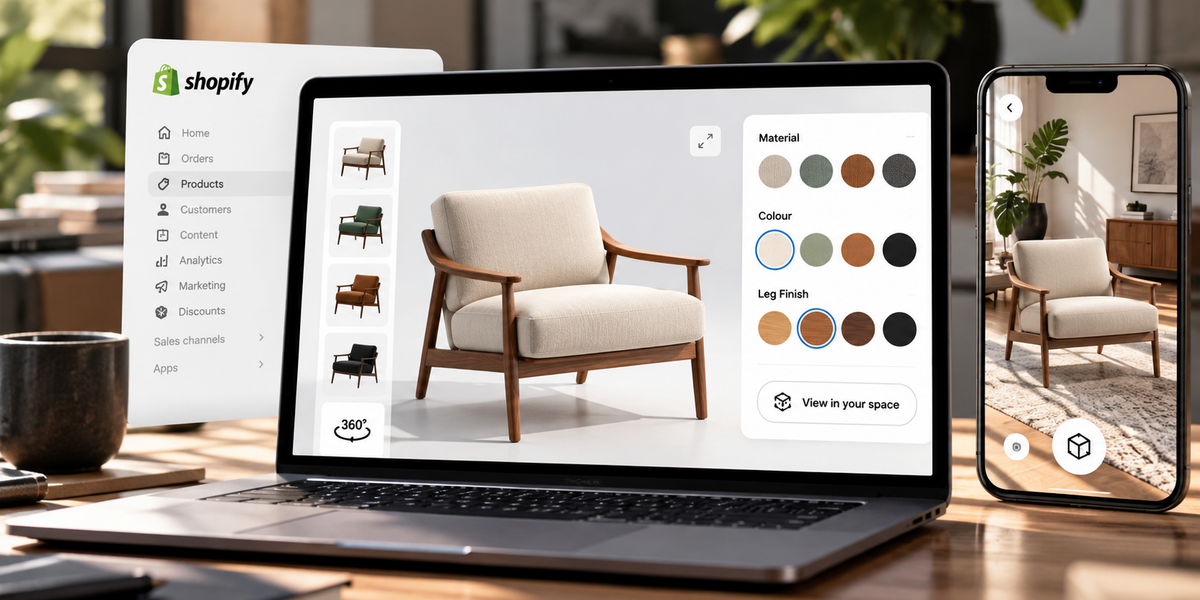
A 3D product configurator should sit inside the store you already have. It should help shoppers understand options more clearly, not force you to redesign your theme, replace your variant system, or invent a new buying journey.
The real problem with configurable Shopify products
The more options you offer, the harder the page becomes to understand.
Colour.
Material.
Finish.
Frame.
Fabric.
Configuration.
Shopify can list those options.
Photos cannot always explain them.
So the shopper does the extra work in their head:
- What does this look like in walnut instead of oak?
- What changes when the fabric switches?
- Does the darker frame make the product feel heavier?
- Is this still the product I wanted, or a different one entirely?
That mental work creates hesitation.
A 3D configurator is useful when it removes that hesitation without disturbing the rest of the product page.
What “without rebuilding” actually means
It means you keep the commercial structure you already trust.
You should not need to:
- rebuild your Shopify theme from zero
- replace your entire product page layout
- abandon native variants
- move checkout into a custom flow
- launch a separate configuration microsite
- wait for a full development project before testing one product
You should be able to:
- keep your existing product page
- add interactive configuration where options matter
- let shoppers see changes in 3D
- preserve the path to cart and checkout
- start with one product, not the whole catalogue
That is the standard.
If a configurator only works after a full rebuild, it is too expensive for most Shopify teams to validate.
When a Shopify store actually needs a 3D configurator
Not every product needs one.
A 3D configurator becomes valuable when:
- the product has meaningful visual options
- those options change appearance in ways photos cannot show quickly
- shoppers repeatedly ask what a combination looks like
- the product is expensive enough that uncertainty blocks purchase
- your team is tired of explaining finishes manually
Strong use cases:
- furniture with multiple finishes
- customisable home products
- modular designs
- products with material or colour systems
- specialty goods where the final look matters as much as the base model
Weak use cases:
- simple one-image products
- options that do not change appearance in a meaningful way
- catalogues where the real blocker is price or shipping, not visual choice
Start where uncertainty is visual.
What you should keep from your current Shopify setup
Before adding anything, protect what already works.
Keep:
- your product URL structure
- your current variant logic, where possible
- your cart and checkout flow
- your mobile product page foundation
- your existing product information hierarchy
The configurator should improve understanding.
It should not become the whole store.
A practical setup looks like this:
Shopify remains the system of record for products, variants, pricing, and checkout
The 3D configurator helps the shopper explore visual options
The shopper continues into the normal purchase path
That separation is what prevents a rebuild.
What you need before you start
You do not need a perfect catalogue.
You need one product worth testing.
Prepare:
- a clean 3D model of the base product
- a clear list of approved options shoppers can choose
- rules for which combinations are allowed
- product-page placement for the interactive experience
- a way to publish and embed without custom app development
If you do not have a model yet, do not expand scope.
Solve for one product first.
A practical way to add it to Shopify
Step 1: Choose the right first product
Pick the product with the clearest visual uncertainty.
Good first product traits:
- strong demand
- multiple finishes or materials
- repeated pre-purchase questions
- high enough value that confidence matters
Do not start with your most complex SKU if that complexity will delay launch.
Step 2: Define the options that matter
Only expose choices that change the product in a way the shopper needs to see.
Examples:
- fabric colour
- wood finish
- frame colour
- surface material
Leave out options that do not benefit from 3D visualisation.
The goal is clarity, not maximum configurability.
Step 3: Publish the interactive experience
Use a no-code publishing flow so the experience can live on the product page without a custom rebuild.
In SwiftXR, that means creating the configurable 3D experience, setting the visual options, and publishing it for product-page use.
The important point is not the tool interface.
The important point is that the experience can be added to Shopify without replacing your product page architecture.
Step 4: Place it inside the current product page
The configurator should appear where shoppers already evaluate the product.
Best practice:
- near the main media
- close to variant selection
- visible early on mobile
- never hidden behind multiple clicks
Shoppers should not have to leave the page to understand the product.
Step 5: Keep the buying journey intact
After the shopper explores options, they should still be able to:
- choose the relevant variant
- add to cart
- continue checkout
If configuration becomes a dead end, the experience fails commercially.
Step 6: Test the full mobile path
Most Shopify discovery happens on phones.
Test:
open product page
find the configurator
change options
understand the result
continue toward cart
If any step feels slow, confusing, or disconnected, fix that before expanding to more products.
3D configurator vs Shopify’s standard variant selector
Shopify variants tell the store what the customer selected.
A 3D configurator helps the customer understand what that selection looks like.
They solve different jobs.
Need
Better fit
Managing SKUs, pricing, inventory
Shopify variants
Helping shoppers see option changes
3D configurator
Completing purchase
Shopify checkout
Reducing visual uncertainty
3D configurator
The strongest setup uses both.
Shopify handles commerce.
The configurator handles comprehension.
Common mistakes that force an unnecessary rebuild
1. Trying to configure the whole catalogue first
This delays learning and creates production drag.
Launch one product. Measure. Expand.
2. Replacing the product page with a microsite
A separate configuration experience often weakens conversion because it breaks the journey.
3. Exposing every possible option on day one
Too many choices increase cognitive load. Start with the options that create the most hesitation.
4. Shipping a beautiful viewer with no commercial connection
If the interactive experience cannot support real option understanding and a clean path to purchase, it becomes a demo instead of a sales tool.
5. Waiting for perfect 3D assets across the whole range
Perfection is how configurable commerce projects stall. Useful beats complete.
Where SwiftXR fits
SwiftXR is built for teams that want interactive product experiences without turning Shopify into an engineering project.
With SwiftXR, you can:
- create a 3D product configuration experience
- let shoppers explore visual options in the browser
- publish the experience for use on a product page
- keep the rest of your Shopify setup intact
- start with one product and expand from evidence
The point is not to rebuild your product experience.
The point is to make the experience you already have easier to understand.
Start free: https://swiftxr.io/users/signup
What success looks like
A successful first launch is not “we added 3D.”
It is:
- shoppers can find the configurator
- they understand option changes quickly
- mobile performance is acceptable
- the path to cart still feels natural
- support questions about finishes or appearance decline for that product
- your team learns enough to decide what to publish next
If those are true, you did not just install a feature.
You improved the buying decision.
Frequently asked questions
Can I add a 3D product configurator to Shopify without changing my theme completely?
Yes. The better approach is to embed interactive configuration into the existing product page rather than rebuilding the theme around it.
Do I need a developer to start?
Not for a standard no-code publishing path. You may still want help with placement or theme refinement, but the core experience should not require a custom app build.
Should the configurator replace Shopify variants?
No. Shopify should remain the system for variants, pricing, and checkout. The configurator helps shoppers understand visual choices.
How many products should I launch first?
One strong product is enough. Expand only after the experience is clear and usable.
What products benefit most?
Products with meaningful visual options such as finishes, materials, colours, and modular configurations.
Does this work for furniture and customisable home products?
Yes. Those categories often benefit because appearance changes are central to the buying decision.
The point
You do not need to rebuild Shopify to make configurable products clearer.
You need to stop asking shoppers to imagine every option.
A 3D product configurator works best when it respects the store you already have, improves understanding at the moment of choice, and leaves the purchase path alone.
Keep the product page.
Keep checkout.
Make the options visible.
Start free with SwiftXR: https://swiftxr.io/users/signup