Blog
August 26, 2026
·8 min read360 Product View vs 3D Model Viewer: A Buyer's Guide

Otuokon Nsikak
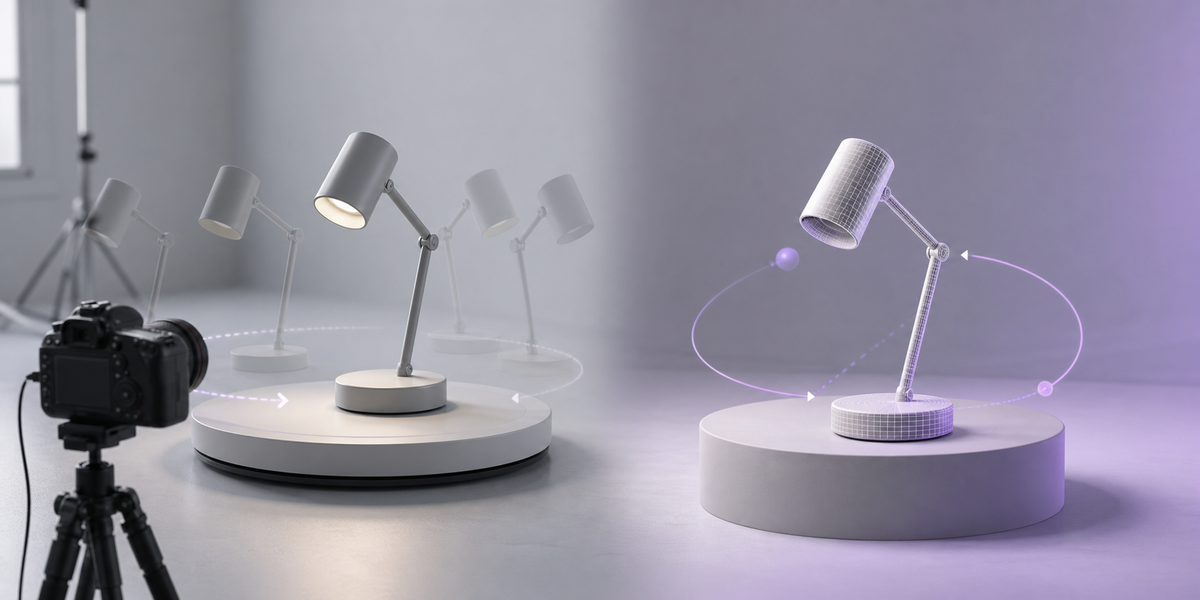
A 360 product view and a 3D model viewer can both let a buyer rotate a product on a page, but they are not the same production system. A typical 360 product view plays a controlled sequence of photographs or rendered frames captured around the product. A real-time 3D viewer renders a three-dimensional model in the browser and can allow freer inspection, controlled material states, and supported AR.
The right choice depends on the buyer task, the authoritative source asset, the product changes you need to show, and how the media will be maintained. Do not choose from the viewer label alone. Many vendors use 360, spin, 3D, and interactive as overlapping marketing terms.
SwiftXR's point of view is simple: decide whether the catalogue needs a fixed capture or a governed product model before deciding how the experience should look. SwiftXR supports the model-first route with browser-based 3D viewing, rotate and zoom interaction, visual controls, supported AR, sharing, and website embedding.
What is a 360 product view?
A photo-based 360 product view is usually a sequence of images captured as the product or camera moves through fixed angles. The viewer changes frames as the user drags, swipes, or hovers, which creates the appearance of rotation. Providers such as Sirv and SpinShot describe this approach as an interactive spin built from product photographs.
The source remains a set of two-dimensional frames. What the buyer can see is limited to the angles, lighting, product state, and detail captured during production. A multi-row spin can add more vertical coverage, but every available view still needs to be captured or rendered in advance.
This can be the right choice when:
- the finished physical product is the most authoritative visual source;
- natural material variation must be captured as it exists;
- one approved product state is enough;
- a controlled horizontal spin meets the buyer task;
- the team already has a repeatable photography workflow; and
- AR, dynamic variants, and wider 3D reuse are outside scope.
The important requirement is not a minimum frame count. It is whether the captured frames cover the inspection task without creating gaps or implying views that do not exist.
What is a 3D model viewer?
A real-time 3D model viewer uses geometry, materials, textures, lighting, and camera settings to render the product as the buyer interacts with it. The source asset is a product model rather than a frame sequence.
That distinction can support more flexible inspection. The buyer may be able to rotate around several axes, zoom, open controlled views, or launch supported AR. The same approved model can also be used as an input for still renders, animation, configuration, training, or other interactive experiences when those outputs are separately validated.
SwiftXR currently lets teams upload or create 3D models, set colours, lighting, hotspots, camera angles and AR scale, then publish a shareable link or embed an experience. Its 3D model viewer page describes browser-based rotate and zoom interaction and supported AR routes.
A 3D model viewer is usually the stronger starting point when:
- the catalogue already has approved CAD or 3D source assets;
- buyers need views that were not pre-captured;
- approved colours, materials, or components must change visually;
- the product may be placed in supported AR;
- the model should support several controlled outputs; or
- product revisions need an explicit asset record and release owner.
A 3D model is not automatically web-ready or product-accurate. Geometry, materials, scale, orientation, textures, naming, performance, rights, and fallback media still need acceptance criteria.
The real difference is the source asset
The visual interaction can make both formats look similar at first. The operational difference sits underneath.
- **Authoritative visual source:** A 360 view uses captured or rendered frames. A 3D viewer uses a governed model and material set.
- **Viewing freedom:** A 360 view is limited to prepared frames. A 3D viewer is controlled by the model, camera, and viewer settings.
- **Product states:** A 360 workflow usually needs a capture or render sequence for each state. A 3D workflow can define approved states from controlled materials or components.
- **AR route:** A photo sequence does not provide AR by itself. A 3D model can support AR when the model, scale, viewer, and device route are validated.
- **Change workflow:** A 360 view needs affected frames to be recaptured or rerendered. A 3D view needs the governed model or materials to be revised, reapproved, and republished.
- **Reuse:** A 360 source primarily supports the captured spin and derived frames. A governed model can become an input for viewers, stills, animation, configuration, AR, and other approved outputs.
This is why a procurement brief should name the source asset. A request for an interactive viewer is incomplete if it does not say whether the supplier must deliver photographs, rendered frames, a web-ready 3D model, or both.
Compare the buyer task before the technology
Start with what the buyer must understand or decide.
Use a fixed spin for a fixed inspection task
A photo spin can work well when the buyer needs a consistent exterior review of one finished product state. The team controls every visible angle, reflection, and lighting condition during capture. That predictability can matter for products where the real manufactured surface is more authoritative than a digital material.
Ask whether the prepared frames reveal the important sides, controls, connectors, finishes, or construction details. If the answer is yes, extra viewing freedom may not improve the decision.
Use real-time 3D when the question changes by buyer or product state
A 3D viewer becomes more useful when buyers need to inspect from several directions, review approved visible options, understand components, or place the product in supported AR. The interaction should still be constrained by the buyer task. Unlimited camera movement is not a substitute for good product information.
Keep dimensions, specifications, availability, price, compatibility, and ordering information in the systems that own them. A visual state must not imply a commercial state unless the implementation actually connects and validates both.
Compare production and governance, not only appearance
The cost and effort sit in different places.
A 360 photography workflow needs the physical sample, capture environment, consistent turntable or camera movement, lighting, retouching, frame export, file naming, and viewer delivery. A new finish or physical revision may require another capture.
A 3D workflow needs an approved model, geometry and texture preparation, web optimisation, scale and orientation checks, material governance, viewer configuration, device testing, and revision control. If the organisation already owns accurate CAD or 3D assets, the model can become a reusable source. If it does not, creating and approving that source is part of the project.
Do not assume either route is automatically faster, cheaper, lighter, or more accurate. Those outcomes depend on catalogue size, source quality, product complexity, production standards, and the destination experience.
Use a controlled pilot to choose
Select a representative product that exposes the real decision. Avoid the easiest item if the wider catalogue includes reflective materials, configurable parts, difficult geometry, or strict colour requirements.
Test both routes against the same acceptance record:
1. Which buyer and buying stage are in scope? 2. Which product questions must the media answer? 3. What is the authoritative visual source? 4. Which angles and states must be available? 5. Is supported AR required? 6. Which facts remain outside the viewer? 7. What fallback is shown if the interactive media cannot load? 8. Who owns product revisions and release approval? 9. Which browsers, devices, and input methods must pass? 10. What evidence decides whether the pilot is ready?
Use the pilot to document tradeoffs, not to manufacture a winner. One product group may be served by a controlled photo spin while another needs a governed 3D model.
When a mixed portfolio is the best answer
The decision does not have to apply to every SKU.
Use photo-based 360 views where finished physical surfaces and fixed exterior inspection are the priority. Use real-time 3D where viewing freedom, visible variants, AR, or wider asset reuse is required. Keep static photography for human context, close material detail, packaging, scale cues, and any evidence that the model should not carry alone.
The portfolio should share naming, product identifiers, alt text, fallback rules, mobile crop standards, revision ownership, and measurement definitions. The buyer should experience one coherent product page even when several media types support it.
The buying decision
Choose a 360 product view when a controlled sequence of approved frames fully answers the buyer task. Choose a 3D model viewer when the organisation needs a governed model that supports freer inspection, controlled visible states, supported AR, or reuse across approved outputs.
Before signing a supplier or platform agreement, ask for the exact source asset, deliverables, rights, device support, fallback, revision process, and acceptance test. A strong viewer cannot repair a weak or unauthorised source asset.
Explore the SwiftXR 3D model viewer, review the SwiftXR platform, or book a demo to scope a representative product-media pilot.