Blog
August 5, 2026
·8 min readProduct Photography vs 3D Rendering: A Catalogue Production Guide

Otuokon Nsikak

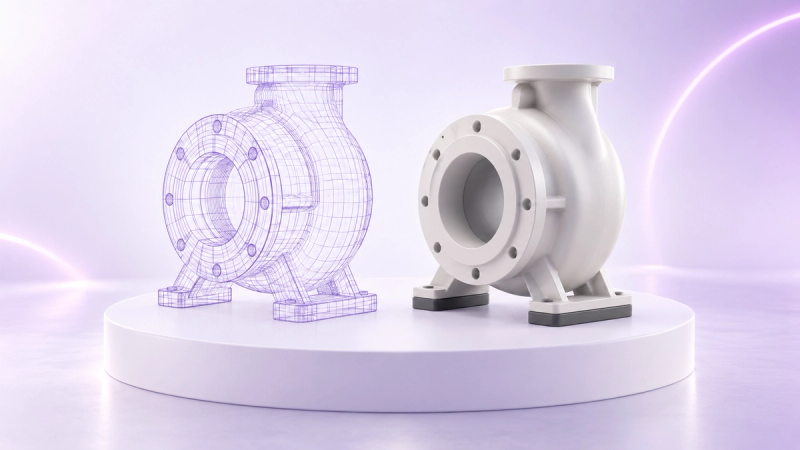
Product photography and 3D rendering solve different production problems. Photography is usually the stronger source when a finished physical product, natural material variation, or human context must be captured exactly as it exists. 3D rendering is usually stronger when an approved digital model already exists, products must be visualised before samples are available, or one source needs to support many approved views and variants. Many catalogue teams need a controlled hybrid rather than a winner.
The useful question is not simply, "Which looks better?" It is, "Which source can this team approve, reuse, update, and deliver accurately for the channels in scope?" That shift makes the decision operational. It also gives ecommerce, product, brand, and technical teams a shared way to evaluate the work.
Define the decision before choosing a format
Start with the output list. A product detail page may need a clean hero image, close details, lifestyle context, an interactive viewer, and an AR option. A dealer portal may need approved angles and a browser link. A launch campaign may need imagery before the first production unit exists.
For each output, record:
- The product state that must be shown, including model, option, material, finish, and revision.
- The required channel, crop, file type, resolution, and background treatment.
- Whether the buyer needs a fixed image, an interactive view, configuration, or spatial context.
- The person who approves product accuracy and the person who approves the presentation.
- The source that will be updated when engineering or merchandising changes the product.
This prevents a familiar failure: choosing an attractive production method before the team has defined what the asset must prove.
Where product photography is stronger
Photography begins with the manufactured object. That is valuable when the buyer needs to see the actual surface, stitching, grain, reflectivity, wear, packaging, or interaction with a person. A photographer can also respond to physical details that are difficult to predict from incomplete product data.
Use photography as the leading source when:
- The final physical sample exists and its real material variation matters.
- A person must wear, hold, operate, or demonstrate the product.
- Brand direction depends on a specific location, set, prop, or natural environment.
- The available 3D model is intended for engineering rather than visual communication and has not been prepared for public use.
- The catalogue team cannot verify that digital materials, dimensions, and option rules match the approved product.
Photography still needs governance. The shot list should identify the exact sample, option, angle, lighting direction, crop, and required retouching. Colour reference and approval conditions should be agreed before the shoot. Otherwise, a visually strong image can still represent the wrong revision or leave a priority channel uncovered.
Where 3D rendering is stronger
3D rendering starts from a digital representation of the product. Once that model and its materials are approved for visual use, the team can frame different views without bringing the physical item back into a studio. The same approved source may also be prepared for interactive 3D or AR, subject to channel-specific checks.
Use 3D rendering as the leading source when:
- Product imagery is needed before a finished sample is available.
- The team has reliable product models and an owner for visual accuracy.
- A catalogue contains approved combinations of colours, materials, finishes, or components that must be presented consistently.
- Multiple teams need controlled views from one product source.
- The roadmap includes interactive 3D, configuration, or AR as well as fixed imagery.
The key condition is source quality. A model that opens successfully is not automatically ready for commerce. The Khronos 3D Commerce Asset Guidelines provide industry guidance for delivering 3D assets across commerce experiences. Product teams still need their own acceptance criteria for geometry, scale, materials, naming, and approved options.
What each production workflow requires
A photography workflow usually coordinates samples, logistics, a shot list, a studio or location, lighting, capture, retouching, review, and final exports. Its dependency is the right physical product in the right state at the right time.
A 3D workflow usually coordinates source files, geometry preparation, material definition, lighting, cameras, rendering or real-time presentation, review, and exports. Its dependency is an approved digital product source with enough detail for the intended view.
Neither workflow removes approval work. They move it. Photography concentrates decisions around the sample, shoot, and retouch. 3D concentrates decisions around the model, materials, scene, and reusable output rules.
That distinction matters when estimating effort. Do not compare a finished photograph with an unprepared engineering file, or a finished rendering with an unplanned shoot. Compare complete workflows from source receipt to approved channel asset.
Use a four-part evaluation matrix
Score each route against the same four questions. Use a simple scale such as red, amber, and green, then attach evidence for every rating.
1. Product accuracy
Can the team prove that the source matches the product revision being sold? For photography, record the sample and retouching limits. For 3D, record the model revision, dimensions, material references, and option data. If neither source is reliable, pause production and resolve the product record first.
2. Catalogue and variant coverage
List the approved combinations that buyers may encounter. Decide which combinations need their own asset, which can share a source, and which should not be shown. A configurable product needs explicit option rules. A large catalogue needs naming and ownership that lets teams find the right source later.
3. Channel outputs
Shopify product media can include images, videos, and 3D models. Your own channel mix may differ. Map each requested output to a real delivery requirement: still image, spin, video, interactive model, configurator, or AR view. Then check performance, accessibility, crop, fallback, and device behaviour for that channel.
4. Change governance
Ask what happens when a material is discontinued, a component changes, or a product is renamed. Identify the system that records the change, the assets that are affected, and the owner who approves the update. Reuse only works when the team can trace an output back to its approved source.
When a hybrid workflow is practical
A hybrid workflow uses each source for the job it can support responsibly. A team might photograph a product with people and real locations, use approved 3D models for controlled catalogue angles, and offer an interactive 3D viewer for buyers who need to inspect the object. The sources should complement one another, not compete for authority.
Define the boundary clearly. For example:
- Photography owns human use, natural material variation, and campaign context.
- Approved 3D owns pre-production views, repeatable angles, and supported option combinations.
- Product data owns the list of valid models and options.
- Brand approval owns the final composition and channel presentation.
This model is especially useful when a business already receives CAD or 3D data but still needs photography for emotional or human context.
Run a controlled pilot before scaling
Choose one representative product, not the easiest product in the catalogue. Include at least one important material, one detailed area, and one channel that reflects the wider programme.
Create the same decision-ready output set through the candidate workflows, then review it with product, ecommerce, brand, and technical owners. Test:
- Product revision, dimensions, proportions, materials, and approved options.
- Required angles, crops, backgrounds, and detail visibility.
- Colour review conditions and documented limitations.
- Page loading, responsive behaviour, fallback media, and accessibility.
- File naming, source ownership, approval records, and update handling.
- Reuse across the channels that are genuinely in scope.
Record exceptions instead of hiding them. If a reflective material, transparent component, fine textile, or complex assembly needs a different route, the pilot should reveal that before the workflow is rolled out.
Where SwiftXR fits
SwiftXR Snap turns supported 3D models into high-resolution product images, videos, and GIFs in the browser. It is relevant when a team has an approved 3D source and needs controlled marketing outputs. It does not remove the need to verify the model, materials, and product revision.
For interactive delivery, the SwiftXR 3D Model Viewer supports browser-based product viewing, website embeds, and AR paths on supported devices. The SwiftXR platform provides a browser editor for preparing and sharing 3D and AR experiences, with controls for presentation and experience analytics.
Treat these capabilities as downstream uses of approved product data. The production decision still begins with the buyer task, the source of truth, and the acceptance tests.
Final decision checklist
Before approving product photography, 3D rendering, or a hybrid workflow, confirm:
- The required buyer questions and channel outputs are written down.
- The physical sample or digital model matches the product revision in market.
- Materials, colours, dimensions, and approved variants have named owners.
- The team has compared complete workflows, not isolated production steps.
- Accessibility, fallback, responsive behaviour, and performance are in scope.
- Every output can be traced to an approved source and revision.
- A representative pilot has passed product, brand, ecommerce, and technical review.
- Exceptions and update rules are documented before scale.
If your catalogue already has usable 3D product data, book a SwiftXR demo to review where fixed imagery, interactive 3D, configuration, or AR fits your production plan.