Blog
November 17, 2026
·4 min read3D Configurator vs Simple 3D/AR Viewer: A Decision Guide for Furniture and Modular Products

Otuokon Nsikak
Most furniture brands do not need both tools. They need the one that answers the actual reason shoppers hesitate.
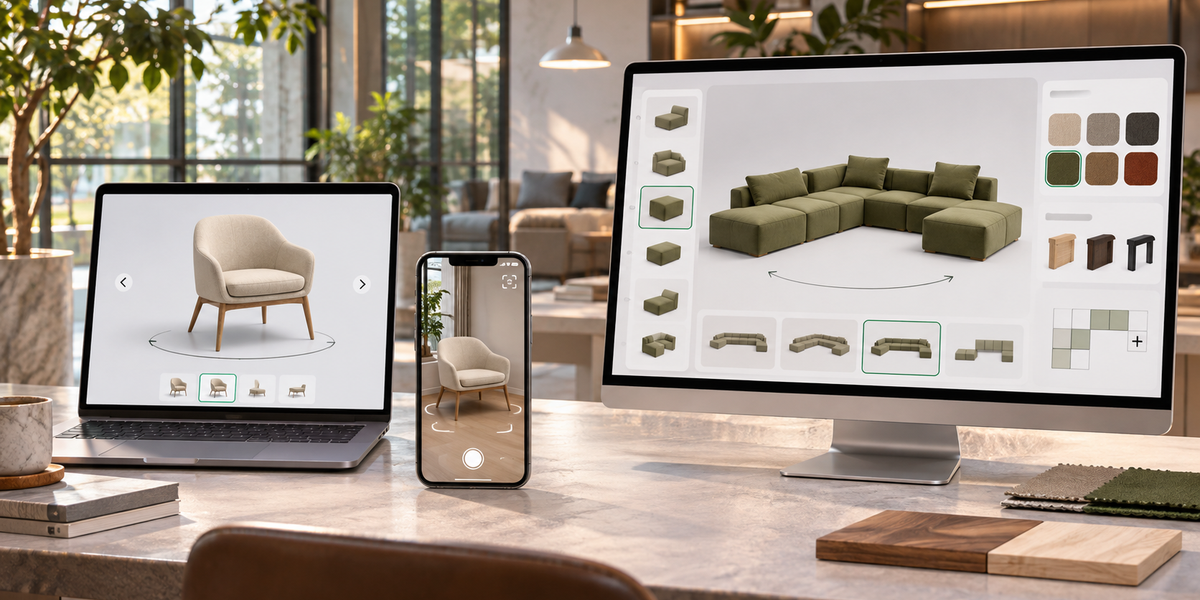
A simple 3D/AR viewer shows one fixed product. Shoppers rotate it, zoom in, and place it in their room at true scale. A configurator lets them change the product itself: swap fabrics, finishes, modules, or dimensions and watch the model update in real time.
The difference matters most for furniture and modular goods because the purchase decision is usually blocked by one of two questions: “Will this fit and look right in my space?” or “Can I get the exact combination I want?”
What each tool actually solves
Simple 3D/AR viewer
Best when the product is sold as-is or with a small number of fixed variants. The main job is reducing size and style uncertainty. Shoppers already know the model they want. They need to confirm it fits their room and matches the rest of their furniture. Implementation is lighter: one optimized model per product (or per core variant), minimal rules, and a straightforward embed.
Product configurator
Best when the product is made-to-order or modular. Shoppers need to choose upholstery, wood finish, leg style, number of modules, or configuration of a sectional. The model must update correctly as options change, and those choices usually need to flow into the cart or quote. This requires more assets (materials, parts, rules) and more setup, but it removes the need for dozens of separate product pages or photos.
Quick decision framework for furniture brands
Use this as a filter before you build:
- If more than 70% of your catalog is stocked and sold in fixed versions, start with a viewer.
- If shoppers regularly ask about fabric, finish, or module combinations, or if your sales team spends time building custom quotes, a configurator is usually the higher-leverage tool.
- If returns are driven by “it looked different in person” or “it didn’t fit,” a viewer plus AR often delivers the fastest return reduction.
- If abandoned carts are driven by “I couldn’t see the color I wanted,” a configurator addresses the root cause.
Many brands eventually use both. The practical path is to launch the simpler tool first on a small set of products, measure the lift, then add configuration only where variant volume justifies the extra work.
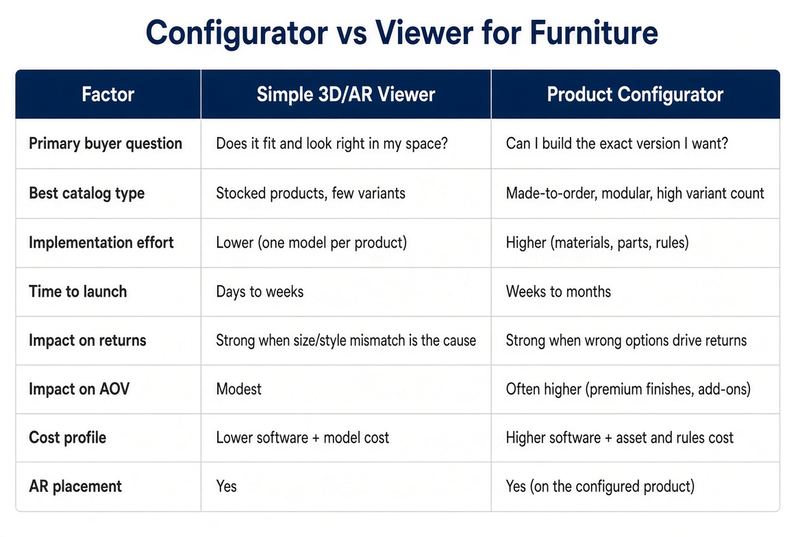
Side-by-side comparison
When a viewer is enough
A viewer is usually the better first step for:
- Standard sofas, chairs, tables, and beds sold in a limited set of finishes
- Brands that already have strong photography and mainly need to answer the “will it fit?” objection
- Teams that want to test 3D and AR with minimal investment before committing to full configuration
- Products where the majority of sales come from the default or most popular variant
Shopify’s native 3D viewer and most basic AR tools fall into this category. They are free or low-cost and sufficient when configuration is not a real buying barrier.
When a configurator pays for itself
A configurator becomes the stronger choice for:
- Modular sectionals, shelving systems, and made-to-order seating where combinations multiply quickly
- Brands that currently rely on swatch photos, PDF configurators, or sales-assisted quoting
- Categories where customers frequently upgrade materials or add modules once they can see the result clearly
- Teams that want one model to replace dozens of variant-specific photos and product pages
Published case studies in furniture (including EQ3 with Cylindo) have shown meaningful conversion lifts when shoppers can configure and then place the result in AR. Those results are before-and-after comparisons rather than controlled tests, so they should be treated as evidence that large gains are possible, not as a guaranteed forecast.
Practical starting recommendation
Most furniture brands should not begin with a full configurator across the catalog. The cleaner sequence is:
Identify 5–10 products where buyer uncertainty is highest (size, style, or options).
Launch a simple 3D/AR viewer on those products first. Measure engagement, add-to-cart, and returns against a control.
If the data shows strong interest in changing finishes or modules, expand those specific products into a configurator.
Keep the rest of the catalog on the lighter viewer until the ROI is clear.
This approach keeps cost and complexity low while still capturing most of the conversion benefit. SwiftXR supports both modes in the same platform, so brands can start with a viewer and add configuration later without switching tools.
The decision is less about which technology is more advanced and more about which buyer question is currently costing you the most sales. Answer that question first.