Blog
September 14, 2026
·6 min readInteractive 3D Content for Ecommerce Websites: A Practical Workflow

Otuokon Nsikak
Most ecommerce product pages still ask the customer to do the hard work.
They show a few photos. Maybe a video. The shopper has to imagine scale, finish, back detail, and how the product will sit in their space. That gap is where hesitation lives. It is also where carts get abandoned and returns get booked.
Interactive 3D content closes that gap. Not by making the page flashier, but by letting the customer inspect the product the way they would in a store: rotate it, zoom in, switch a finish, place it in the room.
The barrier used to be production. Modelling. Development. Weeks of back and forth for a single SKU. That is no longer the only path.
This is a practical workflow for ecommerce teams who want interactive 3D on the product page without turning every launch into a custom build. SwiftXR sits at the centre of it: create or bring in the asset, configure with AI in plain language, publish where you already sell, and measure what shoppers actually do.
What interactive 3D content means on an ecommerce page
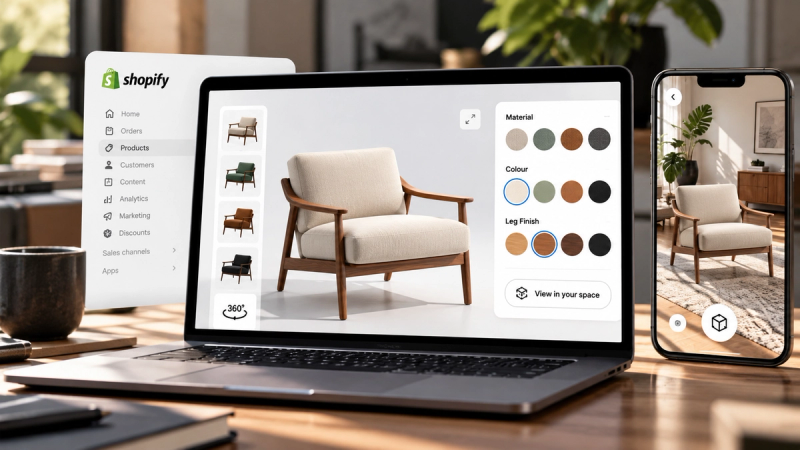
On a product page, interactive 3D is not a gallery replacement. It is a control layer the customer owns.
Depending on how you set it up, a shopper can:
- Rotate and zoom the product
- Inspect materials, stitching, labels, or closures
- Switch colours or finishes in real time
- Open hotspots for key details
- Place the product in their space with AR
- Continue to add to cart without leaving the page
Photos still matter for campaigns and speed. 3D matters for confidence. One answers “what does it look like in your shoot.” The other answers “what does it look like when I control it.”
The workflow, step by step
1. Start with the product, not the software
Decide what the shopper needs to understand before they buy.
For furniture, it is often scale and finish.
For packaging and beauty, it is label detail and material.
For electronics, it is form and ports.
For fashion accessories, it is proportion and surface.
Write that buyer question down. It decides which interactions are essential and which are noise.
Then choose your starting asset:
- An existing GLB or similar web-ready model
- A clean product image you can convert into a starting 3D asset
- A model from your catalogue or design team
You do not need to rebuild the product from scratch inside a modelling suite to get a useful ecommerce experience live.
2. Get the asset into SwiftXR
Create a project and import the product.
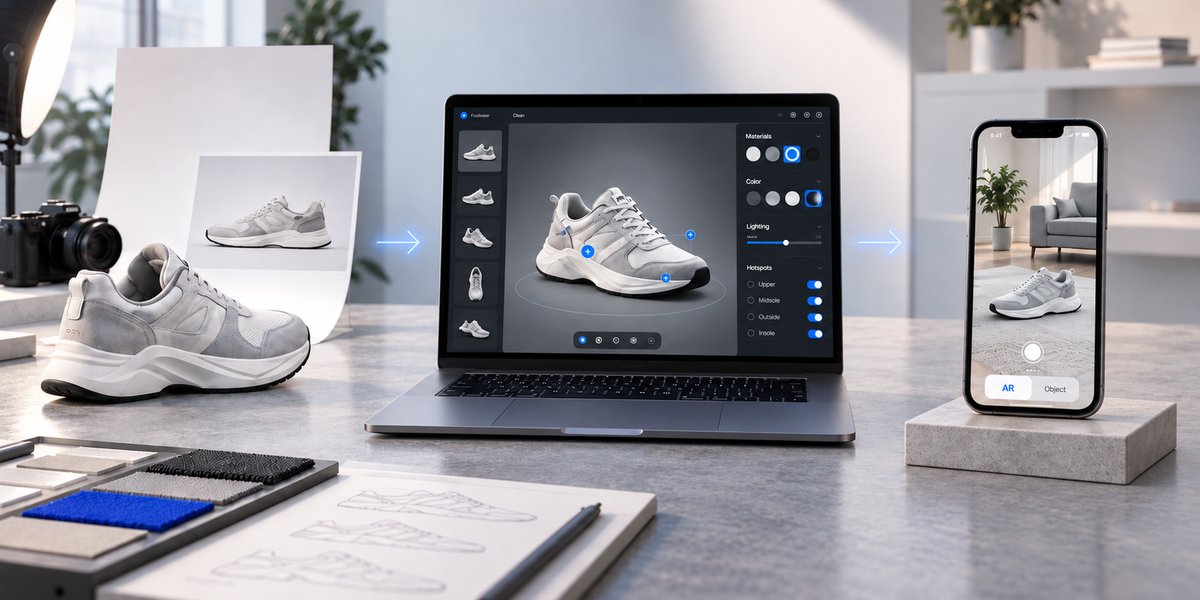
If the model is already web-ready, upload it. If you are starting from a product image, use image-to-3D conversion to produce a workable base, then refine from there.
Keep performance in mind from the first step. A model that looks perfect in isolation but stalls on a phone is not ecommerce-ready. Aim for a file weight that loads cleanly on mobile. Heavy assets create the same hesitation you were trying to remove.
3. Configure the experience with AI, in plain language
This is where the old workflow usually slows down. Menus. Panels. Material settings. Camera setup. Small changes that still need someone who knows the editor.
With the SwiftXR AI Assistant, configuration starts from the decision you already made.
Describe what you want:
- “Change the colour to matte black.”
- “Switch the seat material to linen.”
- “Create a navy variant and a cream variant.”
- “Set the opening camera on the front label.”
- “Add a hotspot for materials and one for dimensions.”
Specific prompts work best. Name the part, the change, and the boundary. “Change only the tabletop to white marble and leave the base unchanged” is clearer than “make it premium.”
You still decide what the product should look like. The Assistant shortens the path between that decision and a live, editable result. The visual editor stays available when you want precise control.
This is the practical shift for ecommerce teams. Merchandisers and marketers can run routine configuration work without routing every material swap through a specialist queue.
4. Make it commerce-ready, not just configurable
A configured model is not finished until a real customer can use it on a real device.
Before you publish, check:
- Dimensions feel accurate in AR where placement matters
- Text and hotspots stay readable on a phone
- Loading is acceptable on a normal mobile connection
- Variants map to the options you actually sell
- The next step is obvious: add to cart, view details, request a quote
This is the step teams skip when they treat 3D as a visual upgrade instead of a product-page tool. A beautiful model that cannot load, or cannot lead somewhere, does not help the sale.
5. Publish on the page you already have
SwiftXR experiences embed on ecommerce sites and product pages, including common platforms such as Shopify, WooCommerce, Wix, WordPress, Webflow, Squarespace, and BigCommerce.
The point is not a separate destination. The point is the product page the shopper is already on. They inspect in 3D or AR, then continue the same buying path.
No app download for the customer. No full site rebuild for the team.
Why this workflow fits ecommerce teams
The commercial value is not that AI is involved. The value is what gets shorter.
Faster iteration. A finish test that used to wait in a production queue can happen in the time it takes to describe it.
Less bottleneck on specialist time. The people closest to the catalogue can make routine changes without learning a full 3D toolchain first.
More variants when demand supports them. Supporting six finishes instead of three stops being a capacity problem if configuration is no longer the expensive part.
Clearer confidence on the product page. Customers stop guessing about detail and scale. That is often where hesitation breaks.
None of that requires the software to be clever for its own sake. It requires the distance between a merchandising decision and a publishable product experience to stay short, across a catalogue, not only in a demo.
Questions? Book a call or join the community on Discord.
Frequently Asked Questions
Do I need a finished 3D model before I start?
Not always. You can begin with an existing web-ready model or, where supported, convert a clear product image into a starting asset, then configure the experience in SwiftXR.
Does the AI build the whole product from nothing?
The AI Assistant is strongest at configuring and preparing a product experience in plain language: materials, variants, camera, interactions. Complex original modelling and brand-critical art direction still benefit from a human specialist when the product demands it.
Will this replace my product photography?
No. Photography and video still do important work. Interactive 3D adds customer-controlled inspection and, where relevant, AR placement. Use both.
Does the shopper need an app?
No. SwiftXR experiences run in the browser on modern desktop and mobile devices, including AR where the device supports it.
Can this sit inside my current ecommerce platform?
Yes. Publish with an embed or platform-friendly setup on the product pages and site structure you already use, rather than rebuilding the store around a new stack.