Blog
September 16, 2026
·8 min readHow to Create an Interactive 3D Fashion Showroom Without Code

Otuokon Nsikak
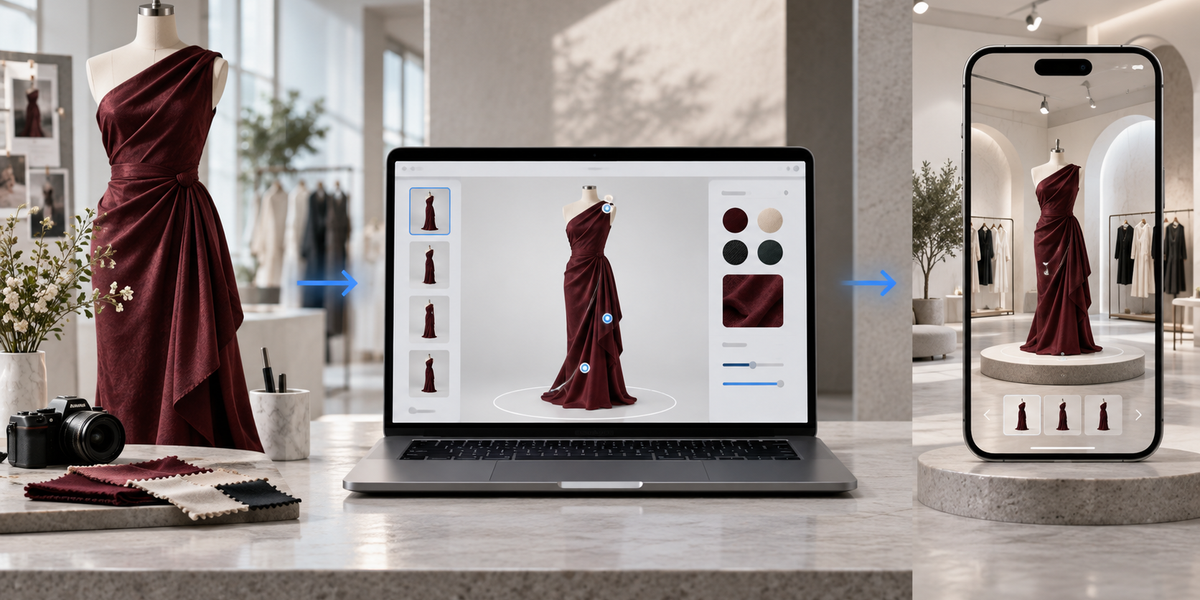
A fashion showroom used to mean a physical space, a limited set of samples, and whoever could get through the door.
Online, most brands still replace that with a grid of photos. Flat. Fixed. One angle at a time. The customer does the hard work: imagining drape, proportion, finish, and how a look holds together.
An interactive 3D fashion showroom changes the job. Shoppers can rotate a piece, inspect detail, switch a colour or fabric, move through a curated collection, and in some cases place or try items in context, without downloading an app and without you hiring a development team to build a custom experience.
This guide shows a practical no-code workflow. The goal is not a digital decoration. The goal is a showroom customers can actually use.
What an interactive 3D fashion showroom is
It is not a 360 spin bolted onto a product page, and it is not a full game engine build.
A useful fashion showroom is a browser-based space where visitors can:
- Explore garments, accessories, or looks in interactive 3D
- Rotate and zoom to inspect construction, texture, and finish
- Switch approved variants such as colourways or materials
- Move through a curated set of products or seasonal looks
- Open key details through hotspots where they help
- Continue to a product page, enquiry, or purchase path
For fashion, the showroom answers the questions photos leave open: how the piece reads from the side and back, how finishes compare, and whether the collection feels coherent as a whole.
Why no-code matters for fashion teams
Fashion calendars move fast. A showroom that needs a developer for every update will fall behind the season.
No-code means your merchandising, ecom, or brand team can:
- Publish a collection room without a custom build
- Update a look when a colourway changes
- Add a new drop without restarting production
- Test one room, measure it, then expand
SwiftXR is built for that path. You work in a browser editor, configure the experience, and publish a link or embed. Shoppers open it on a phone or laptop with no app install.
The workflow
1. Decide what the showroom is for
Before you upload anything, write the buyer job in one line.
Examples:
- Let wholesale buyers review the new season without flying in
- Let DTC shoppers explore a drop before it sells out
- Let press and partners inspect looks between appointments
- Let customers compare finishes across a capsule
That decision controls everything else: which products go in, how much interaction you add, and what the next step after viewing should be.
A showroom without a clear job becomes a pretty room that does not move anyone forward.
2. Gather the right product assets
You need 3D assets that can survive the web.
Start with:
- Existing GLB or similar web-ready models
- Prepared fashion assets from your 3D or design team
- Clean product imagery where image-to-3D can give you a workable starting point
Prioritise hero pieces first. A tight room of 8 to 12 strong products beats a bloated room of 60 weak ones.
Keep file weight practical. Heavy models slow mobile loading, and fashion traffic is heavily mobile. If a piece cannot load cleanly on a phone, it does not belong in the first version of the showroom.
3. Build the room in SwiftXR
Create a project and bring the products in.
Arrange the experience around how a real buyer moves:
- Opening view on the strongest look or product
- Clear path from piece to piece
- Enough space between items that inspection feels intentional
- Consistent lighting so materials read honestly
You are not designing a museum for its own sake. You are designing a commercial path through the collection.
4. Configure looks with plain-language AI
This is where no-code becomes fast enough for fashion teams.
With the SwiftXR AI Assistant, you can describe changes instead of digging through panels for every adjustment:
- “Switch this dress to the black colourway.”
- “Change the fabric to matte satin.”
- “Set the opening camera on the front look.”
- “Create a navy and cream variant of this bag.”
- “Add a hotspot for materials on the blazer.”
Specific prompts work best. Name the product, the change, and the boundary. You still decide what is on-brand. The Assistant shortens the distance between that decision and a live result.
This matters in fashion because small merchandising changes are constant. If every colour test needs a specialist queue, the showroom freezes while the season moves on.
5. Add only the interactions that help the buy
More interaction is not always better.
Useful additions for fashion:
- Variant switching for approved colourways and materials
- Hotspots for fabric, care, or construction details
- Clear labels for look names or SKU families
- A direct route to the product page or line sheet
Skip clutter. If a hotspot does not answer a real buyer question, leave it out.
Where relevant, enable AR so shoppers can place accessories or assess scale in their own space. For wearable categories that support it, virtual try-on and face tracking can reduce uncertainty further. Use what fits the product. Do not force every feature into every room.
6. Make it commerce-ready
A configured room is not finished until a real customer can use it.
Before publish, check:
- Mobile load speed
- Text readability on a phone
- Variant accuracy against what you actually sell
- Camera angles that show the garment honestly
- A clear next step: shop the look, view product, request access, book appointment
Fashion buyers and shoppers will not fight a slow or confusing experience. If the showroom creates friction, they return to photos or leave.
7. Publish without a developer
Publish from SwiftXR as a shareable link or embed.
Use it:
- On a campaign landing page
- Inside a wholesale buyer portal
- On collection pages
- In email or sales outreach as a direct link
- Alongside an event or drop announcement
The point is distribution. A showroom that only lives in an internal demo does not do commercial work.
8. Measure and refine
Track whether people enter, how long they stay, which products they inspect, and whether they continue to product pages or enquiry actions when those events are connected.
Then adjust. Maybe the opening look is wrong. Maybe one colourway gets all the attention. Maybe a hotspot is ignored. Treat the showroom like merchandising, not like a one-time build.
What to put in the first version
Keep the first room disciplined.
A strong pilot usually includes:
- One collection or drop, not the entire catalogue
- Hero SKUs with the highest consideration or return risk
- Approved variants only
- One clear audience: DTC, wholesale, or press
- One primary call to action
Once that room works, expand. Fashion teams get into trouble when the first version tries to replace the whole brand archive on day one.
Why this works without code
The old path was:
brief → 3D team → development → revisions → launch → freeze until the next budget cycle
The no-code path is:
assets in → configure in the editor → use AI for fast merchandising changes → publish → measure → update
SwiftXR is the publishing layer in that path. Fashion teams keep ownership of product decisions. The platform removes the need to translate every decision into custom software work.
That is the real advantage. Not that 3D exists. That your team can run it at the speed of a season.
From lookbook to live showroom
Interactive 3D fashion showrooms are no longer reserved for brands with in-house XR teams.
If you have the products and a clear buyer job, you can build a room shoppers and partners can actually explore:
Define the purpose
Start with web-ready product assets
Arrange the collection in SwiftXR
Configure variants and details with AI prompts
Keep interactions commercial, not decorative
Publish to the page or link your audience already uses
Measure and improve
Your collection already exists. The missing piece is a showroom people can enter without being in the building.
Frequently Asked Questions
Do I need a developer to publish the showroom?
No. SwiftXR is no-code. You configure the experience in the browser and publish a link or embed.
Can I update the room when a colourway changes?
Yes. That is one of the main reasons to use a no-code workflow. Update the product or variant and republish without a development cycle.
Does this replace product photography?
No. Photography still matters for campaigns and speed. The showroom adds customer-controlled inspection and collection-level exploration that static images cannot provide.
Can wholesale and DTC use the same room?
They can share assets, but the best results usually come from tailoring the path and call to action to the audience. A buyer room and a shopper room often need different next steps.
What products should I start with?
Start with high-consideration pieces where detail, finish, or proportion affect confidence: tailored garments, footwear, bags, jewellery, and any drop where returns or hesitation are already costly.