Blog
September 11, 2026
·9 min readBest Software to Create Interactive 3D Product Packaging for Your Website

Otuokon Nsikak

Product packaging carries a great deal of the buying decision. Its shape, finish, label, closure and smallest design details can communicate quality before a customer ever touches the product.
But traditional ecommerce photography has limits. A single image shows one angle. A video follows a fixed sequence. Neither gives customers complete control over what they want to inspect.
Interactive 3D product packaging changes that. It allows online shoppers to rotate a bottle, examine the back of a box, zoom in on a label, compare finishes or explore individual product details directly from a website.
The challenge is finding software that makes this possible without turning every product launch into a lengthy development project. Most ecommerce and marketing teams do not have the time to learn traditional 3D software, and with SwiftXR, they do not have to. Teams can use the AI-powered workflow to describe the experience they want, or begin with a product image and convert it into a 3D asset before configuring the experience. For businesses that want to create, publish, and measure immersive packaging experiences without writing code, SwiftXR is one of the best options available.
What is interactive 3D product packaging?
Interactive 3D product packaging is a digital representation of packaging that customers can control on a screen. Instead of viewing a collection of static photographs, they can move around the product and explore it from different perspectives.
Depending on how the experience is configured, shoppers may be able to:
- Rotate and zoom in on the packaging.
- View labels, ingredients or usage information.
- Compare colours, materials and finishes.
- Select between product or packaging variants.
- Open information hotspots.
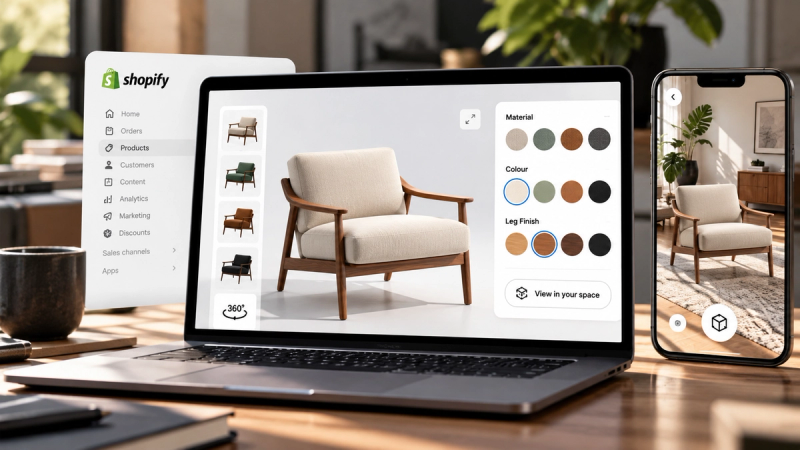
- Place the product in their environment using augmented reality.
- Continue to a product page, enquiry form or purchase action.
This is particularly useful for cosmetics, beverages, consumer electronics, luxury goods, food products, supplements and other categories where packaging contributes strongly to perceived value.
What should good 3D packaging software do?
Choosing a platform should not be based on visual quality alone. The best software must also fit into the way ecommerce and marketing teams actually work.
Look for five essential capabilities.
1. Simple experience creation
The software should make it easy to turn an existing 3D packaging asset into an interactive experience. Teams should not need to build a custom application every time they introduce a new product.
2. Customisation and interaction
A useful platform should support more than basic rotation. It should allow teams to configure materials, colours, camera positions, hotspots, product information and customer actions.
3. Website and ecommerce publishing
The experience needs to work where customers already shop. That means publishing to product pages, campaign landing pages and online stores without requiring shoppers to install a separate application.
4. Mobile and augmented-reality support
Packaging experiences should work across modern desktop and mobile devices. Where relevant, augmented reality can help customers understand scale or see how the product fits into their environment.
5. Measurement
Publishing is only the beginning. Brands need to understand whether customers viewed, explored or interacted with the experience—and how that engagement connects with meaningful actions.
Why SwiftXR is a strong choice for interactive packaging
SwiftXR is a browser-based platform for creating, publishing and measuring interactive 3D, AR and VR product experiences. It helps teams move from an existing product asset to a live customer experience without writing code or building a separate app.
The distinction matters: SwiftXR is built to create the interactive product experience around your packaging. You can bring in an existing 3D model, start from a product image and convert it into a usable 3D asset, or use the AI Assistant to guide the experience-building process.
Once the product is inside SwiftXR, teams can configure how customers see and explore it. They can add interactions, adjust the scene, present different finishes and publish the completed experience wherever the product is sold online.
Create through plain-language instructions
With the SwiftXR AI Assistant, users can describe the experience or change they want in ordinary language. The Assistant can help adjust the scene, content and interactions, while the visual editor remains available for precise control.
This means marketers, ecommerce teams and product owners do not need to become 3D designers before they can create something useful. Instead of learning complicated modelling controls, they can communicate their intent through familiar instructions and refine the result visually.
For example, a packaging team could request:
- “Create an experience that lets customers rotate this perfume bottle.”
- “Add hotspots for the fragrance notes and bottle materials.”
- “Show the packaging in black, white and gold.”
- “Set the front label as the opening camera view.”
- “Add a button that takes customers to the product page.”
This closes the gap between the team's creative intention and the technical process required to publish it.
Publish where customers already shop
SwiftXR experiences can be embedded in websites, product pages and online stores or shared through a direct link. The platform supports popular website and commerce environments, including Shopify, WooCommerce, Wix, WordPress, Webflow, Squarespace and BigCommerce.
Customers can interact with the experience through their browser. They do not need to download another app or create a new account simply to explore the product.
Measure what customers explore
SwiftXR includes analytics for experience views, visitors, engagement time and interactions. When commerce events are connected, teams can also examine how customers who engaged with an experience progressed toward actions such as adding a product to their cart or completing a purchase.
This does not guarantee sales. It gives brands clearer evidence about how customers engage with their packaging and where the experience can be improved.
How to create an interactive 3D packaging experience with SwiftXR
Step 1: Start with a model or product image
If you already have a suitable 3D model of the bottle, box, pouch, tube, or other packaging format, you can use it as your starting point. Ensure that important visual elements, such as the label, cap, material, and surface finish, are represented clearly.
If you do not have a 3D model, you can begin with a clear product image and use image-to-3D conversion to produce a starting asset. From there, SwiftXR helps you turn that asset into the interactive experience customers will explore.
You do not need to learn professional 3D modelling software to complete the experience. The AI Assistant lets you describe the result and individual changes you want in plain language.
Keep web performance in mind. A model that is unnecessarily heavy may load slowly, particularly on mobile connections.
Step 2: Start a SwiftXR project
Create a project in SwiftXR and attach your 3D packaging asset, or begin with a suitable template where available. Decide what the customer should understand or do after opening the experience.
That objective might be to inspect the packaging, compare variants, understand a feature, experience the product in AR or continue to purchase.
Step 3: Configure the product story
Use the AI Assistant or visual editor to set the camera, lighting, environment, materials, and interactions. Add hotspots only where they help customers make sense of the product.
For packaging, useful hotspots could reveal:
- Ingredients or materials.
- Product benefits.
- Sustainability information.
- Instructions for use.
- Refill or recycling details.
- Available sizes and variants.
The goal is not to overload the model with information. Each interaction should make the product easier to understand.
Step 4: Add customer actions
Connect the experience to a clear next step. Depending on the campaign, this could be “Shop now,” “View ingredients,” “Compare options,” “Request a sample” or “Add to cart.”
A beautiful 3D experience without direction may generate attention but fail to move the customer forward.
Step 5: Test across devices
Check the experience on desktop and mobile screens. Review loading speed, text readability, camera controls, hotspots and buttons. Confirm that every interaction works as intended before publishing.
Step 6: Publish and measure
Embed the experience on the relevant product or campaign page, then monitor how customers use it. Look beyond total views and examine engagement, interactions and connected commercial actions.
Use those insights to improve the experience over time.
Creative ways brands can use interactive packaging
An interactive packaging experience does not have to sit only on a product page. It can support several points in the customer journey.
Brands can use it to:
- Launch a new packaging design before physical production is complete.
- Let customers compare limited-edition colourways.
- Explain refillable or sustainable packaging systems.
- Present premium finishes that are difficult to communicate in photographs.
- Turn a QR code on physical packaging into an extended digital experience.
- Support sales teams and distributors with a shareable product demonstration.
- Create an interactive campaign landing page for a new release.
One 3D product asset can therefore support ecommerce, marketing, sales and customer education—provided the experience is designed around a clear outcome.
Static product images still matter
Interactive 3D should not replace every photograph or video. Those formats remain effective for storytelling, campaign imagery and fast visual communication.
The role of 3D is to add what static media cannot: customer-controlled exploration.
A photograph says, “This is how the product looks.” An interactive experience allows the customer to ask, “What does it look like from here?”
That difference can make online product discovery feel more complete and give customers greater confidence in what they are considering.
Make your packaging worth exploring
The best 3D packaging software should do more than display a model. It should help your team create an experience, publish it where customers already shop and learn from what they do next.
SwiftXR brings those capabilities into one browser-based workflow. Start with an existing model or convert a product image into a 3D asset, use AI to configure how customers should explore it, and publish the finished experience without learning complicated 3D software or building a custom application.
Ready to make your packaging interactive?
Questions? Book a call or join the community on Discord.