Blog
August 20, 2026
·5 min readBest 3D, AR and VR Viewer for WooCommerce in 2026

Otuokon Nsikak
Somebody's staring at a photo of your sofa right now, trying to picture it against their living room wall, and they can't quite get there.
They zoom in. They squint at the fabric texture. They open a tape measure app and guess at the dimensions from memory. Then, more often than you'd like, they close the tab. Or worse, they buy it, and three weeks later it's back in a box headed for your returns pile, because it "looked different online."
This is the oldest problem in ecommerce, and most WooCommerce stores are still solving it the same way they did a decade ago: better lighting, more angles, a longer description. None of that actually answers the one question the customer is really asking: will this work in my space?
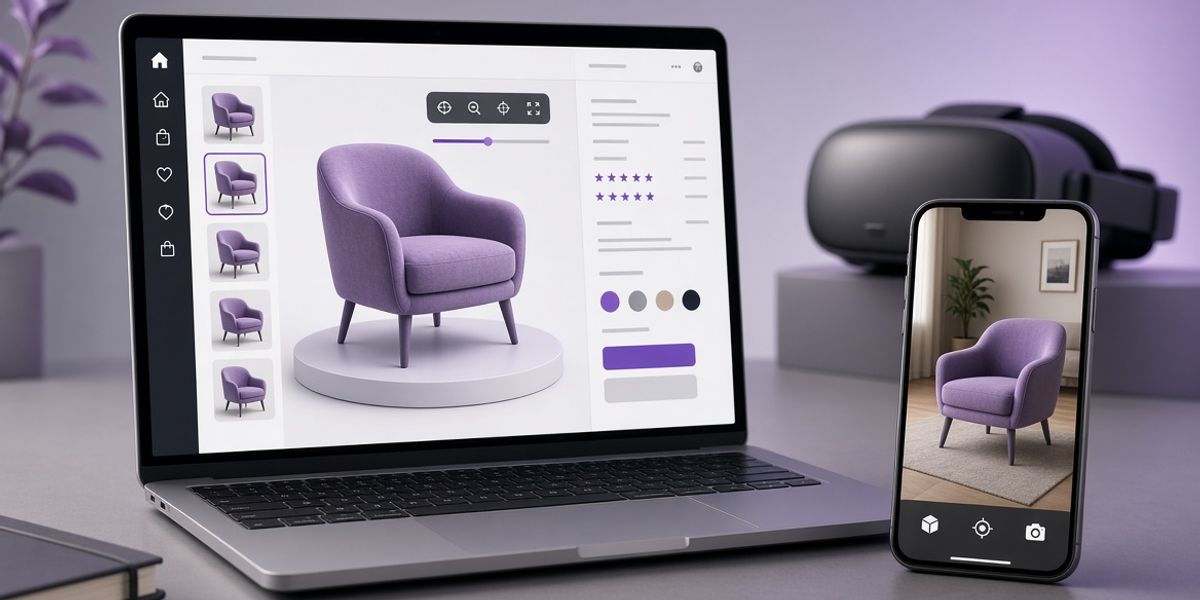
The stores pulling ahead of that problem aren't using better photos. They're letting customers examine the product in 3D, drop it into their own room with AR, and in some cases step into it in VR. The real question isn't whether 3D and AR belong on a WooCommerce product page anymore. It's which viewer actually works without turning into a plugin-conflict headache six weeks from now.
What a Real WooCommerce 3D Viewer Actually Needs to Do
Strip away the feature lists and it comes down to four things.
It has to show the product clearly. Rotate, zoom, inspect the stitching or the grain of the wood, without lag, without a five-second load spinner that makes a customer bail before they even see it.
It has to support real-scale AR, not a toy version of it. Placing the item at true size in a customer's actual room is what kills "will this fit" hesitation. A shrunk-down or inaccurate AR placement does more harm than no AR at all, since it can make a product look wrong.
It has to live inside the existing product page, next to the gallery, the price, the variations, the add-to-cart button, not open in a separate app or a jarring full-screen takeover that breaks the buying flow.
It has to be manageable by whoever runs the store, not just a developer. If updating a model means filing a support ticket, it never gets updated, and the feature quietly rots six months after launch.
Miss any one of these and you get a feature that looks great in a sales demo and creates friction the first time a real customer touches it.
Where Most Plugins Actually Fall Short
Some handle 3D fine and fumble AR, placement drifts, scale is off, or it simply doesn't launch reliably on certain phones. Others nail AR but make product variations clunky, so changing a color means re-uploading a whole new model. A few require custom development work that turns a "quick feature" into a two-month project with an agency.
The predictable result: the store either never fully ships it, or ships a limited version that quietly gets ignored.
How SwiftXR Handles WooCommerce
SwiftXR gives WooCommerce stores a full 3D, AR, and VR experience without those trade-offs.
Upload a 3D model, configure how it displays, embed it on the product page. Customers rotate and inspect it in detail, then tap once to open AR and place it at real scale in their own space, no app download required. WebVR is available too, for a fuller walkthrough when that fits the product.
The whole setup is no-code. Variations link directly to the 3D view, so changing a color or material updates the model instantly instead of requiring a re-upload. It works across devices, and it sits inside the existing product page rather than replacing it, so the path from curiosity to add-to-cart stays intact instead of getting interrupted.
Why This Actually Matters
Furniture, home décor, lighting, fashion, and specialty equipment all share the same weak point: customers can't fully judge them from a photo. That gap between imagination and reality is where returns come from.
When someone can examine a product in 3D and then see it sitting in their actual room, two things tend to happen: they move through the decision with less second-guessing, and they're less likely to send it back because it didn't match what they pictured. (Exact impact varies by product category and how the viewer is implemented; if you want real numbers for your store specifically, testing on one product first is the fastest way to find out.)
For store owners, the practical win is control. Test it on a single product in staging, check the variations and the full checkout path, then decide whether to roll it out wider, no all-or-nothing commitment required.
The Practical Standard
The best 3D, AR, and VR viewer for WooCommerce isn't the one with the longest feature list. It's the one that makes the product easier to understand, fits naturally into the page customers already trust, and doesn't need a developer on standby every time something needs updating.
Ready to test it on one product?
Start Free Trial today.
No credit card. No developer. Live on your store in minutes.
Questions? Book a call or join the community on Discord.